Tutorial
Learn The Pastor’s Research Assistant, step by step
A walk through every part of the app, from your first study to preaching from a tablet. Each feature is shown on its real screen, with numbered steps. Follow it in order, or jump to the part you need.
Find your way around
 1234
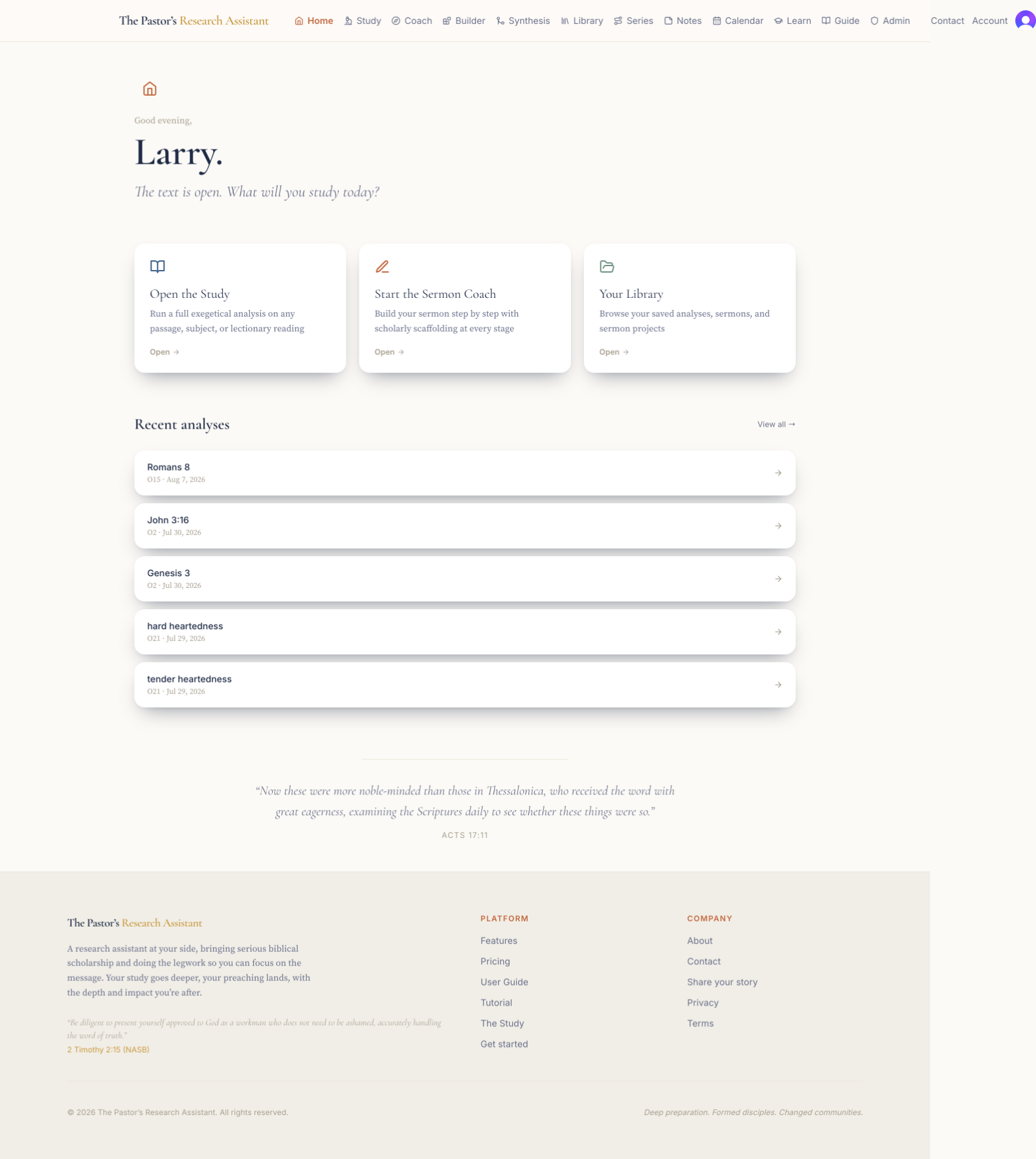
1234When you sign in you land on your home page. It greets you, points you to the three things you will do most, and shows your recent work. Every part of the app is one click away in the top navigation.
- 1
The top navigation is always present: Home, Study, Coach, Builder, Synthesis, Library, Series, Notes, Calendar, Learn, and Guide. Click any of them from anywhere in the app.
- 2
The three cards, Open the Study, Start the Sermon Coach, and Your Library, are the fastest way into the work: research a passage, build a sermon step by step, or return to what you have saved.
- 3
Recent analyses lists the studies you have run lately. Click any one to reopen it, or choose View all to see your whole Library.
- 4
The Guide link opens the written manual whenever you want it; this Tutorial walks you through each screen with pictures.
Open the text in the Study
 123456
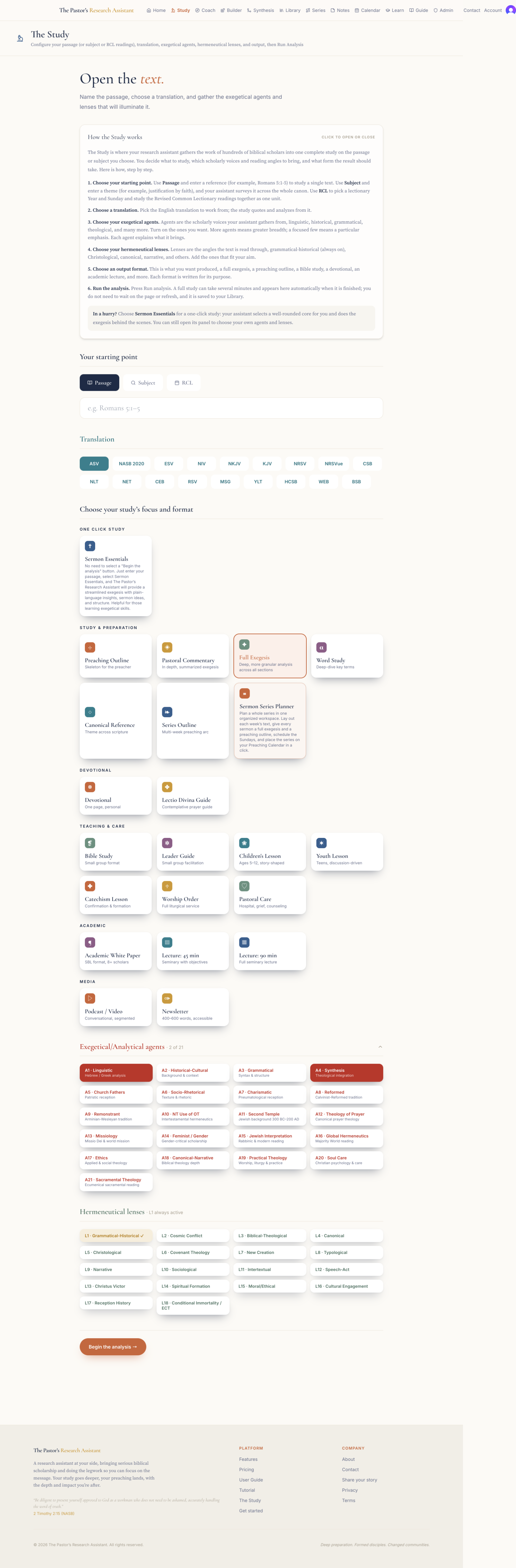
The Study is where your research assistant gathers the work of hundreds of scholars into one complete study on the passage or subject you choose. You decide what to study, which scholarly voices and reading angles to bring, and what form the result should take.
- 1
Choose your starting point. Passage studies a single text; enter a reference like Romans 5:1-5. Subject surveys a theme across the whole canon, for example justification by faith. RCL studies the Revised Common Lectionary readings for a chosen Year and Sunday together as one unit.
- 2
Choose a translation. The study quotes and analyzes from the English translation you pick.
- 3
Choose an output format. This is what gets produced: a full exegesis, a preaching outline, an accessible Bible study, a devotional, an academic lecture, and more. Each is written for its own purpose.
- 4
Choose your exegetical agents. Agents are the scholarly voices your assistant gathers from: linguistic, historical, grammatical, theological, and more. Turn on the ones you want; more agents mean greater breadth, a focused few mean a particular emphasis.
- 5
Choose your hermeneutical lenses. Lenses are the angles the text is read through: grammatical-historical, which is always on, plus Christological, canonical, narrative, and others. Add the ones that fit your aim.
- 6
Press Run analysis. A full study can take several minutes. It runs in the background, so you can leave the page; it appears in your Library, and here, the moment it is finished.
Tip
Not sure where to begin? A Passage study with the default agents and a Full Exegesis output is a dependable first study for any text.
Read and export your study
 234
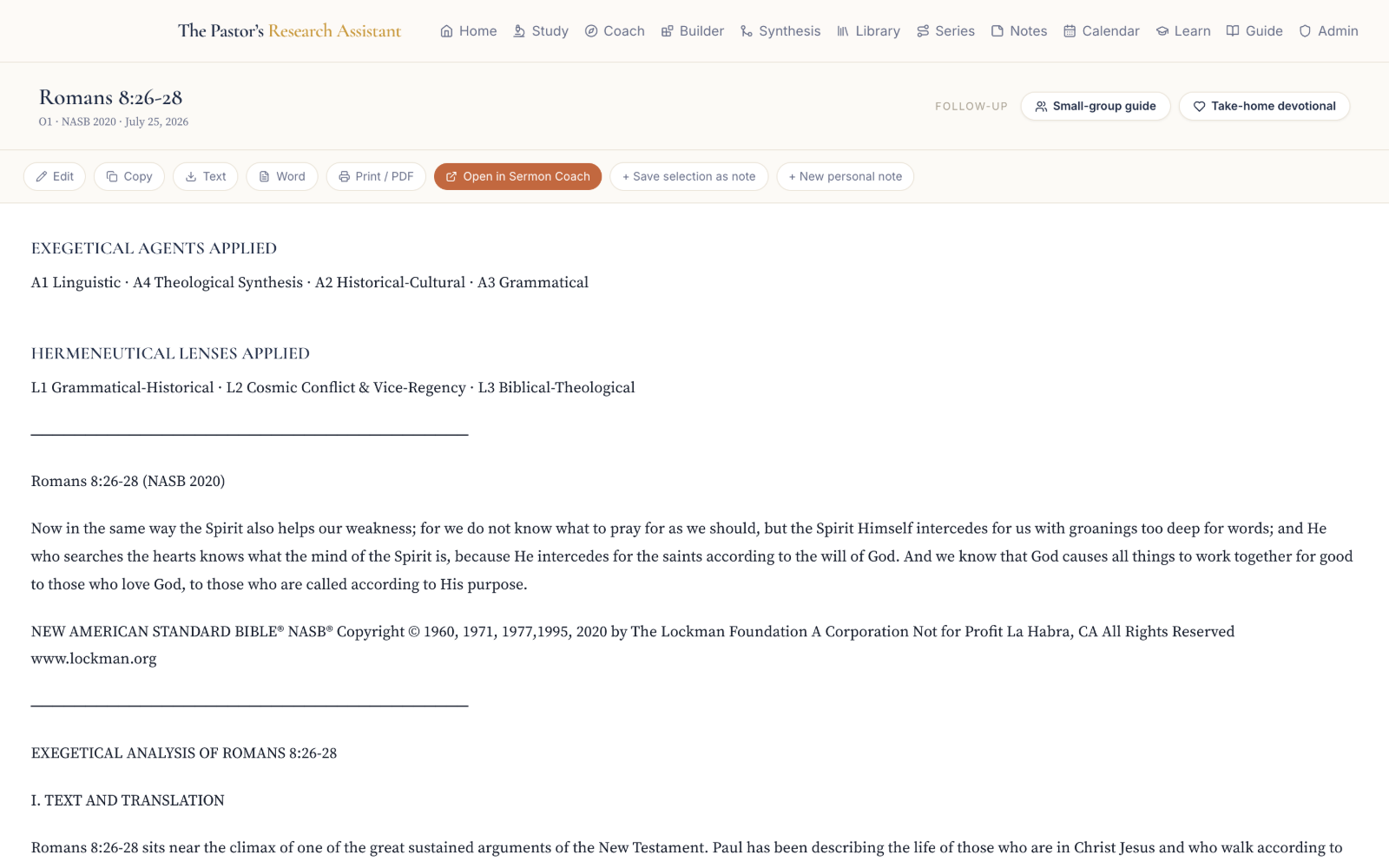
234When a study is ready it opens as a clean, sectioned document. Each section reflects the agents and lenses you chose. From here you read, save what matters, and export it in whatever form you need.
- 1
Open the study from your Library, or from Recent analyses on the home page. While it is still generating it shows "Still writing," and it loads on its own the moment it finishes.
- 2
Read through the sections in order. The study moves from the text itself outward to interpretation and application, following the agents and lenses you selected.
- 3
Use the buttons at the top to copy the text, or to export to Word, PDF, or PowerPoint. Your chosen Scripture translation is inserted automatically.
- 4
Highlight any sentence worth keeping and use Save selection as note to keep it in your Notes, where you can find it later by search or by hashtag.
Weave studies together with Synthesis
 1234
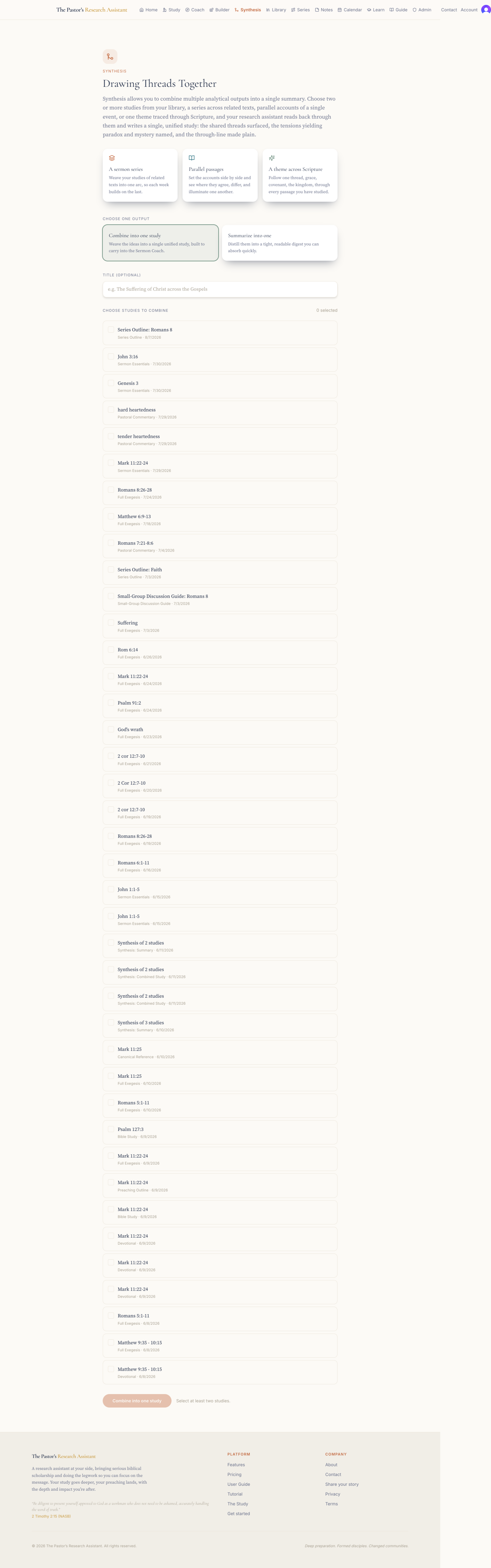
1234Sometimes a message gathers a theme across several passages, or you want the essence of several studies in one place. Synthesis takes two or more of your completed studies and brings them together into a single, coherent piece.
- 1
Open Synthesis from the navigation.
- 2
Choose Combine into one unified study, which reads them as a single connected treatment, or Summarize into a digest, which distills them to their essence.
- 3
Select two or more of your completed studies from the list.
- 4
Press Combine (or Summarize). When it is ready, open the result on its own, or send it into the Sermon Coach to build one message from many texts.
Build your sermon in the Sermon Coach
 12345
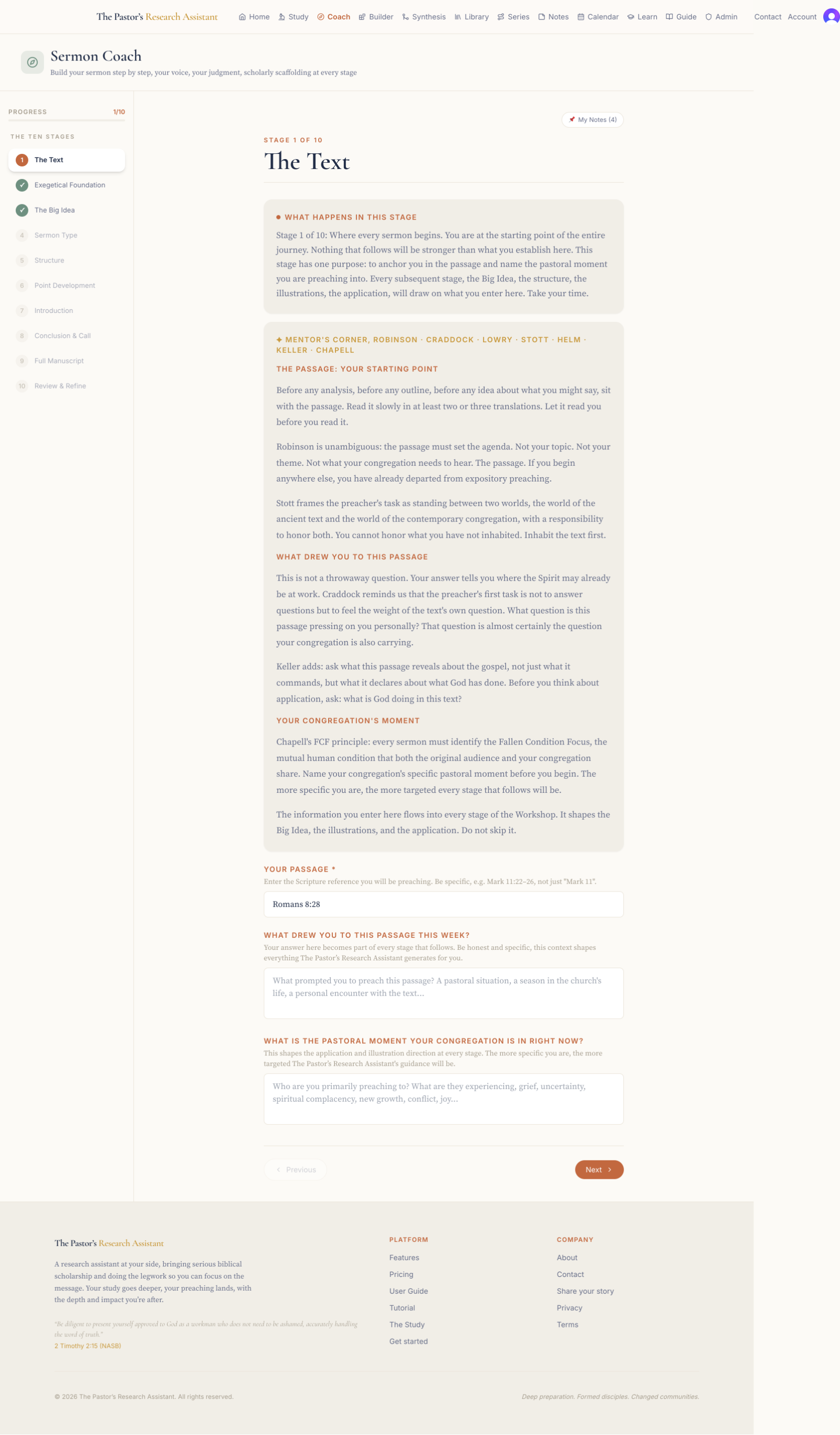
12345The Sermon Coach walks you through building your own sermon across ten stages, with scholarly support at every step. It never writes the sermon for you; the message that emerges is genuinely yours. Your assistant does the legwork, and you keep the judgment, the voice, and the pulpit.
- 1
Open the Coach. If you have already run a study on this passage, it loads as your exegetical foundation.
- 2
Move through the ten stages in order, shown down the left: the Text, Exegetical Foundation, the Big Idea, Sermon Type, Structure, Point Development, Introduction, Conclusion and Call, Full Manuscript, and Review and Refine. A checkmark marks each stage you finish.
- 3
At each stage, read "What happens in this stage" and the Mentor’s Corner, which brings the counsel of respected teachers of preaching such as Robinson, Craddock, Lowry, Stott, Keller, and Chapell.
- 4
Generate suggestions where they are offered, then write your own answer. You stay in control of every word.
- 5
Open My Notes at any point to pull in ideas you saved earlier. When the manuscript is complete, carry it into the Sermon Builder to shape and format it.
Shape and format in the Sermon Builder
 1
1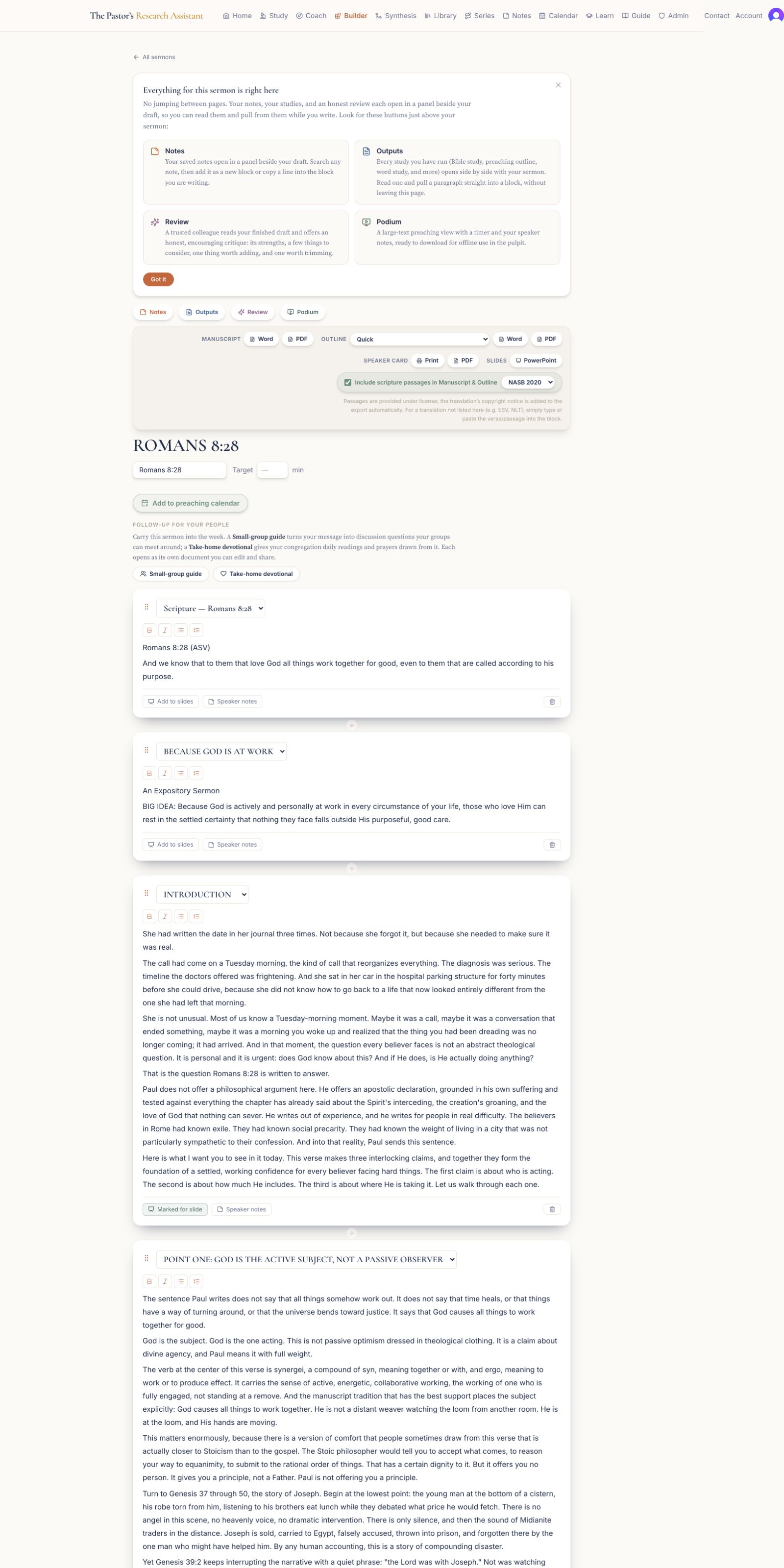 23456
23456The Sermon Builder is where your sermon takes its final shape, whether it arrives from the Sermon Coach or you start fresh. It is a block editor: each part of the sermon is a movable block you can rewrite, reorder, and prepare for the pulpit.
- 1
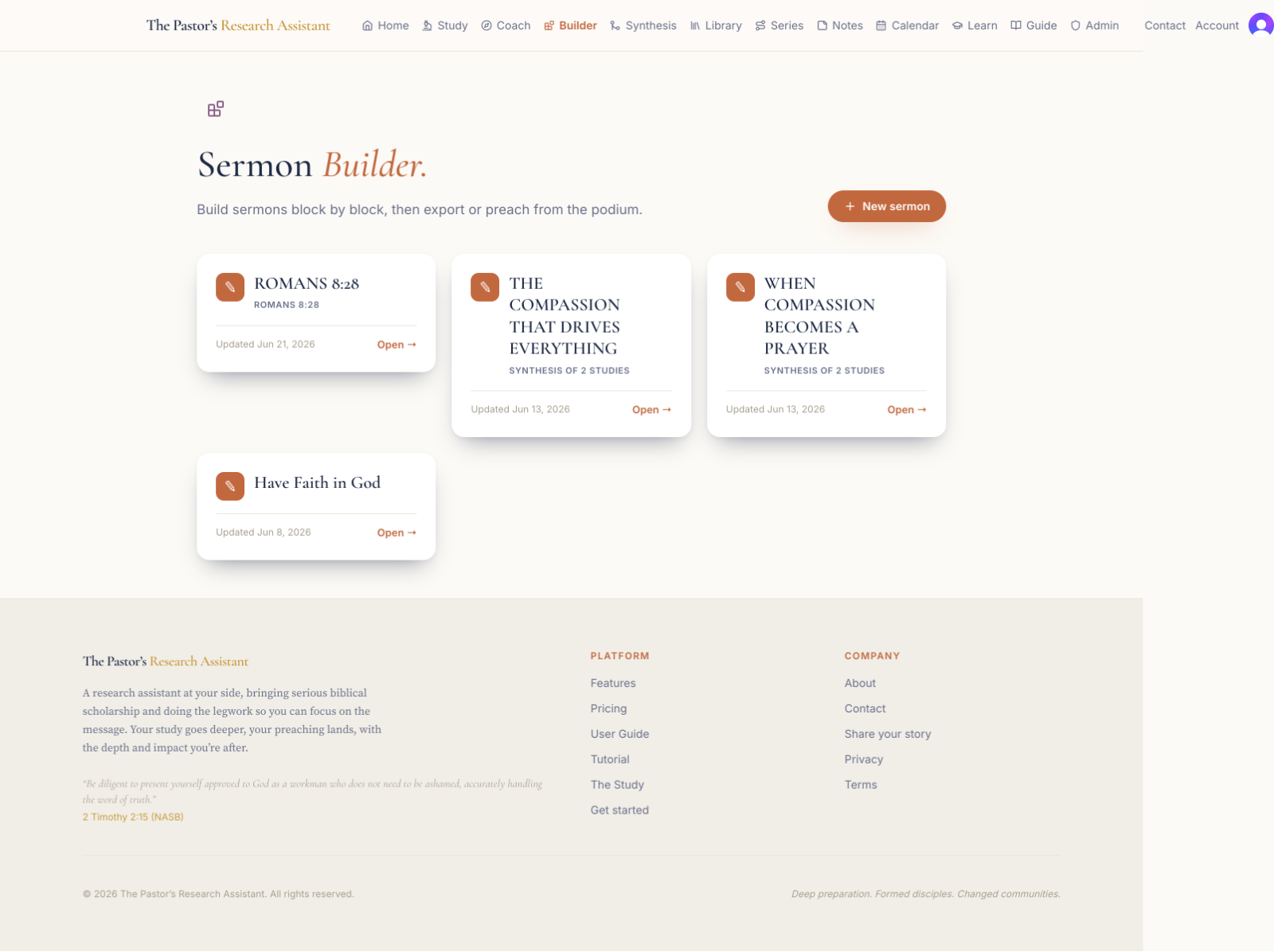
From the Builder home, click New sermon and choose a form: Expository, Narrative, Inductive, Four Pages, Christ-Centered, Problem and Solution, ME-WE-GOD-YOU-WE, or Blank. Your assistant lays out that form’s structure as labeled, empty blocks; the structure is the assistant’s, the message is yours.
- 2
Your sermon opens as blocks: Title, Big Idea, Introduction, Scripture Exposition, each Point, each Illustration, Application, and Conclusion. Drag to reorder them, and rewrite any block in your own voice.
- 3
Use a block’s label to shape it: name a block "Illustration" and Suggest illustrations writes full, ready-to-preach illustrations; name one "Conclusion" and Suggest conclusions drafts ways to land the message.
- 4
Use the tools at the top to produce a full Manuscript (Word or PDF), an Outline, a Speaker Card for the pulpit (Print or PDF), and Slides (Word or PowerPoint), with Scripture inserted in your chosen translation.
- 5
Add follow-up for your people: a Small-group guide turns the sermon into discussion questions, and a Take-home devotional gives daily readings and prayers drawn from it.
- 6
Open the side drawers for your Notes, your past studies, and an on-demand Review of the whole sermon. Add the sermon to your Preaching Calendar, then open Podium mode to preach.
Preach from Podium mode
 234
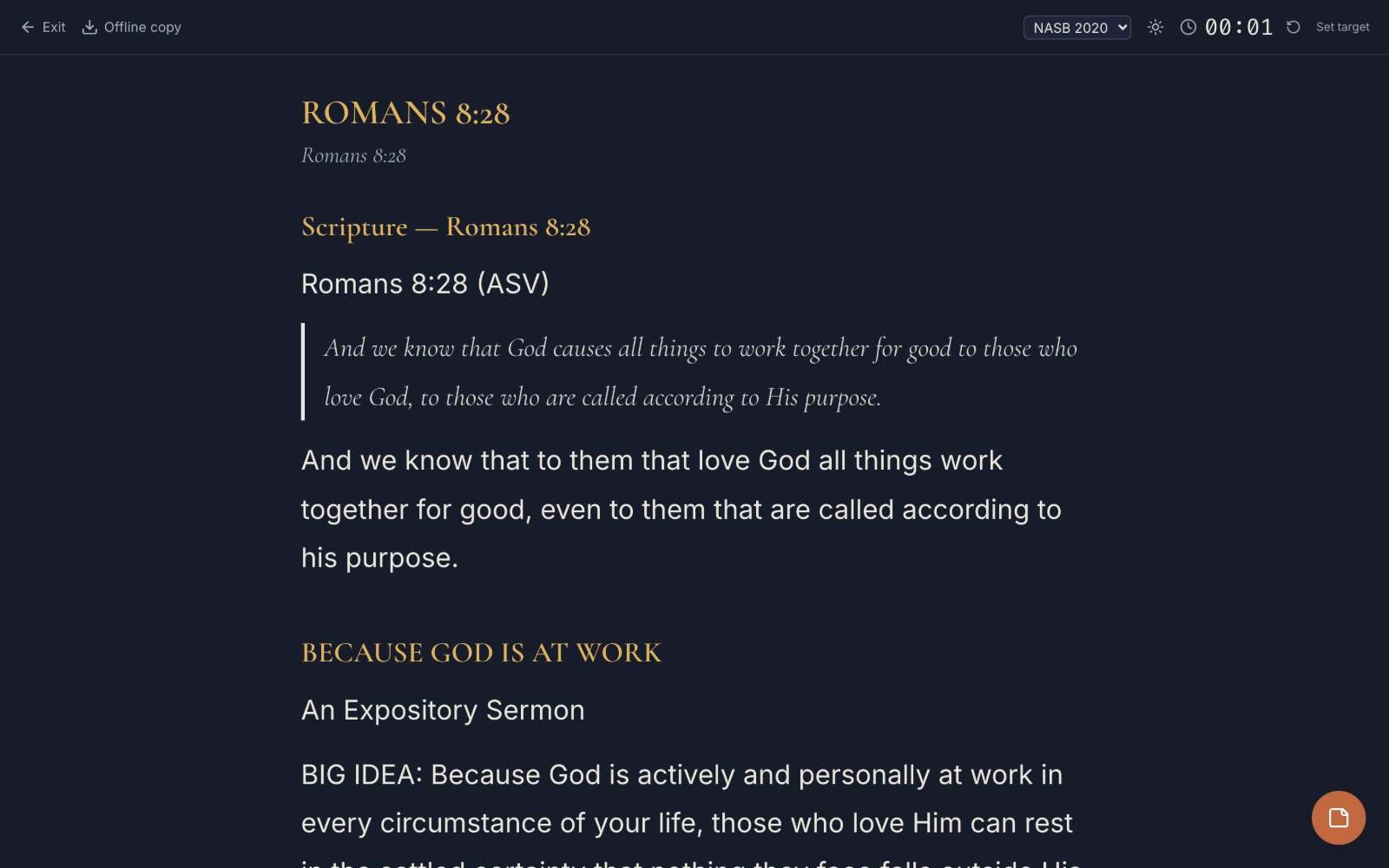
234Podium mode turns a tablet or phone into the pulpit: large, calm, and free of distraction. Everything you need to preach is on one screen.
- 1
Open Podium mode for your sermon from the Builder.
- 2
Scroll your outline or full manuscript as you preach; the text is set large and clear for reading at arm’s length.
- 3
Slide out the side panel to see the speaker notes you added. The screen splits so the manuscript shrinks to make room; your notes never cover your words.
- 4
Keep an eye on the running timer, and switch between day and night mode to suit the room.
Plan a preaching series
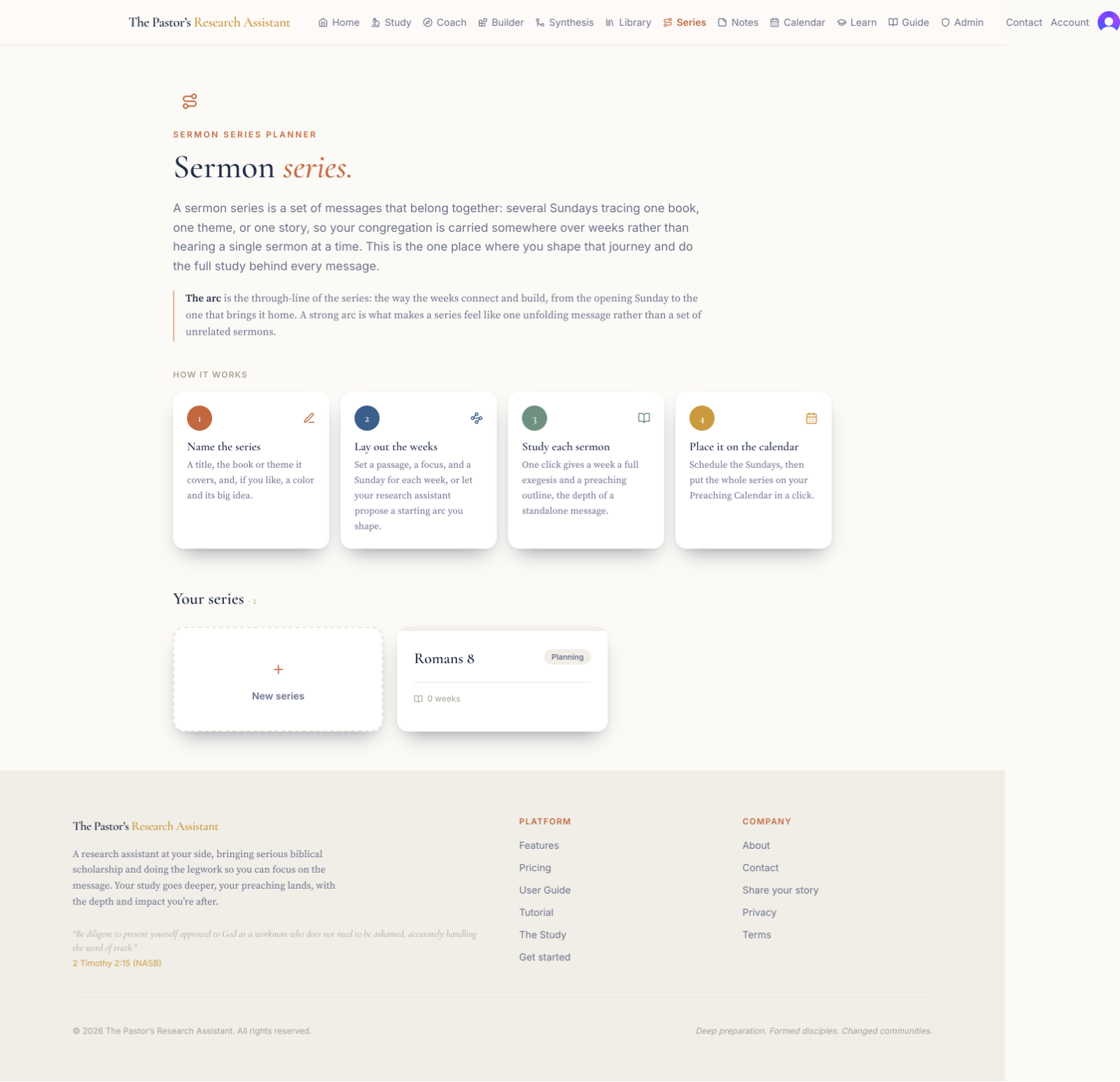 1
1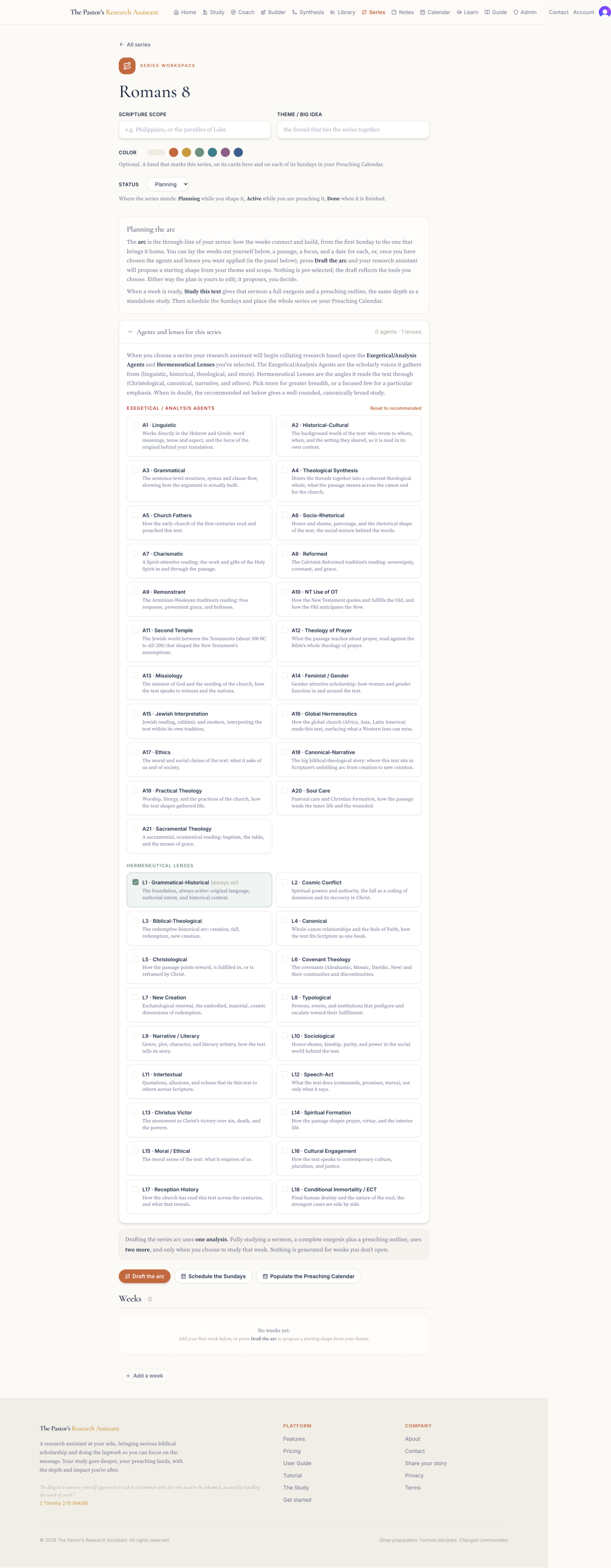 24
24The Series Workspace holds a multi-week series in one place: the arc of the whole, and the text and focus of each week. From here you can study any week’s passage and build its sermon without losing the thread.
- 1
Open Series and click New series, giving it a title and, if you like, a theme or the number of weeks.
- 2
Lay out the weeks. Each week carries its own text and a one-line focus, so the series reads as a single journey rather than separate Sundays.
- 3
For any week, choose Study this text to run a full study on that passage, or move it into the Coach to build that week’s sermon.
- 4
Let your assistant draft the arc of the series when you want a starting shape, then adjust every week to your own plan.
Plan ahead with the Preaching Calendar
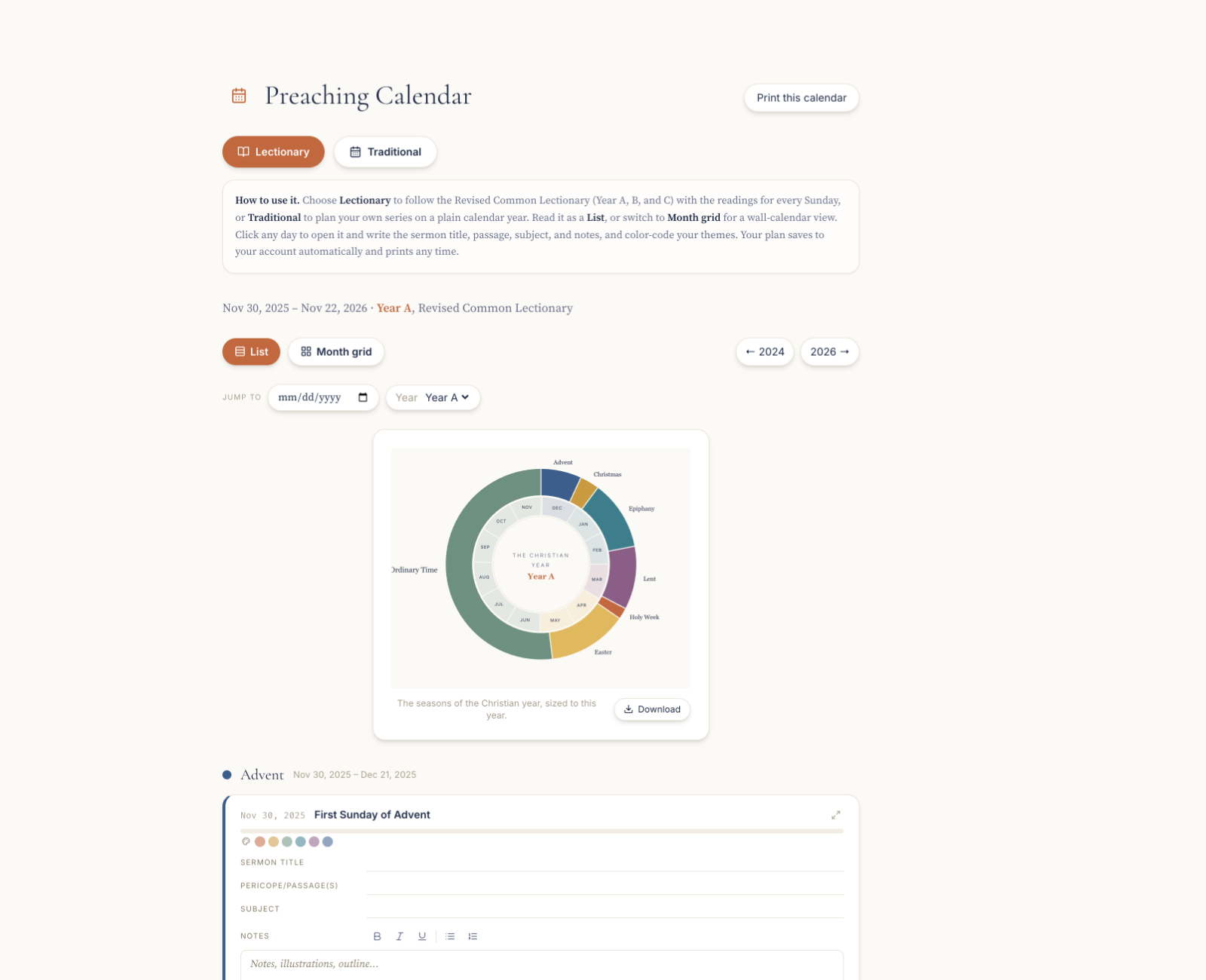 123
123The Preaching Calendar gives you the long view of your preaching. It shows the church year and lets you place a text or a finished sermon on any Sunday, so you are always preparing with the season in mind.
- 1
Open Calendar. Switch between the Lectionary view, which shows the Revised Common Lectionary readings, and a Traditional view of the church year.
- 2
Choose List for a running agenda, or Month for the grid.
- 3
Click any day to see or set the plan for that date: the readings, a text you intend to preach, or a sermon you have already built.
- 4
From the Sermon Builder, use Add to preaching calendar to place a finished sermon on its Sunday, so your calendar and your work stay in step.
Keep and find ideas in Notes
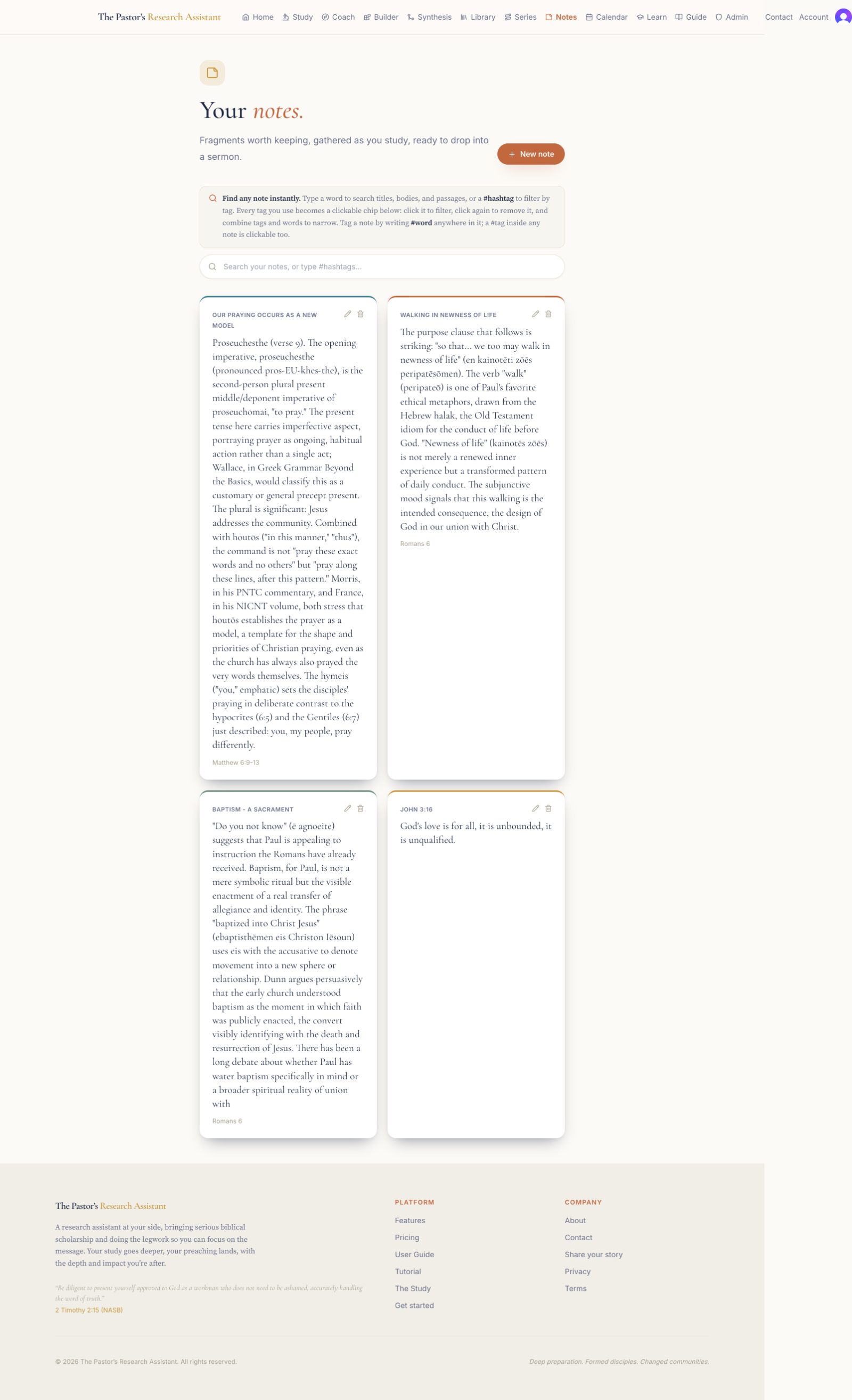 123
123Notes is your commonplace book: a single place for the observations, illustrations, and phrases you want to keep. Everything you save from a study lands here, ready to find again when you need it.
- 1
Open Notes to see everything you have saved, newest first.
- 2
Search by keyword, or type a #hashtag to gather every note on a theme, for example #grace or #prayer. Click a tag to filter to it.
- 3
Save new notes as you study: highlight a sentence in any study and send it here, or click New note to write your own from scratch.
- 4
Pull your notes into the Sermon Coach and the Builder through the side drawer, so the ideas you gathered are at hand while you write.
Grow with the Learning Library
 123
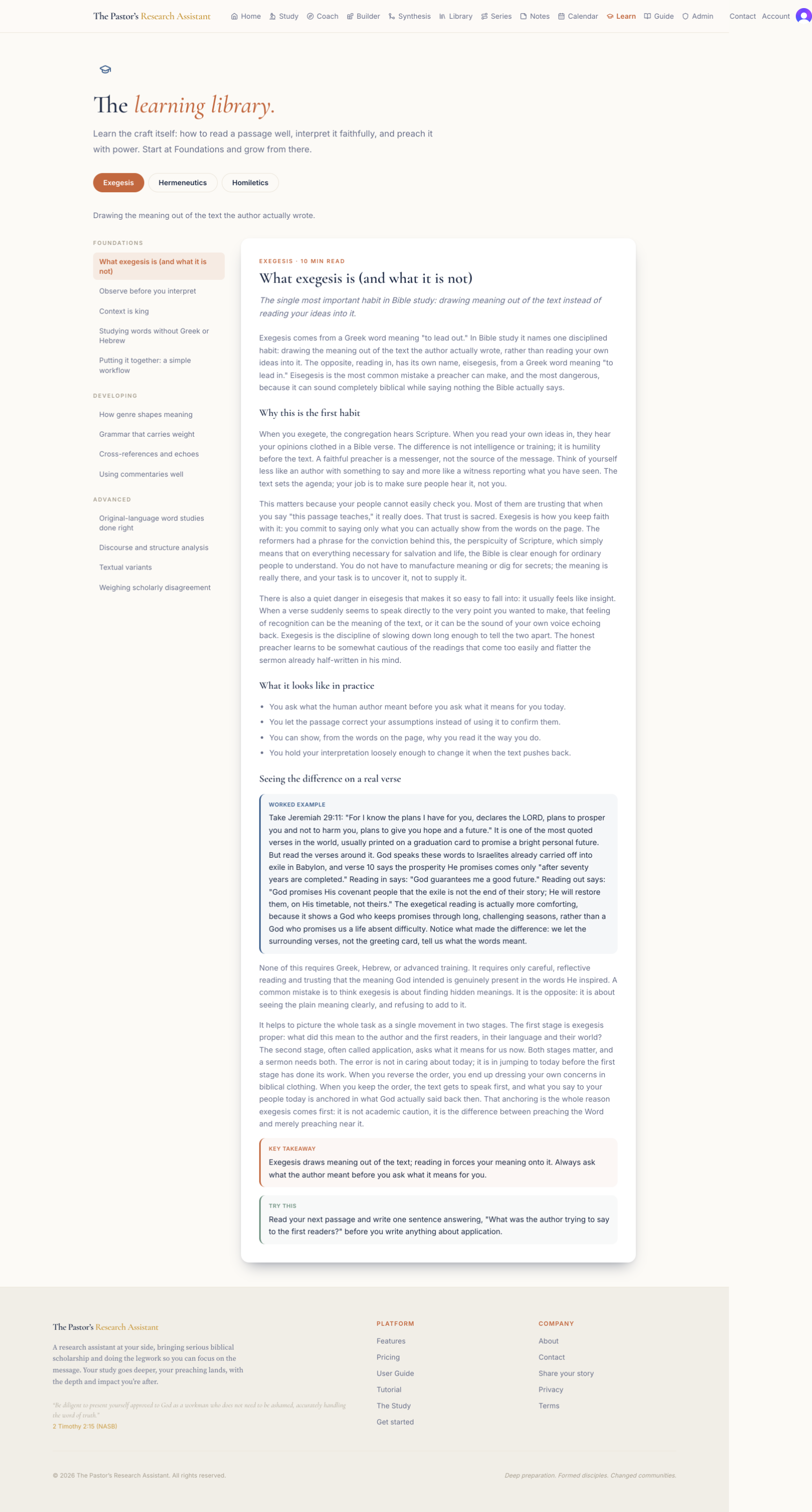
123The Learning Library teaches the craft itself: how to read a passage well, interpret it faithfully, and preach it with power. It is a course you can read at your own pace, written in plain language and grounded in the best of the discipline.
- 1
Open Learn. Choose a track across the top: Exegesis, drawing the meaning out of the text; Hermeneutics, interpreting it faithfully; or Homiletics, preaching it well.
- 2
Work through the lessons down the left, grouped from Foundations to Developing to Advanced. Start at the beginning of a track, or jump to the skill you want.
- 3
Read each lesson in the main pane, and watch for the Worked Example, the Key Takeaway, and the Try This, which turns the lesson into a habit you can practice on your next passage.
Your account and plan
 1234
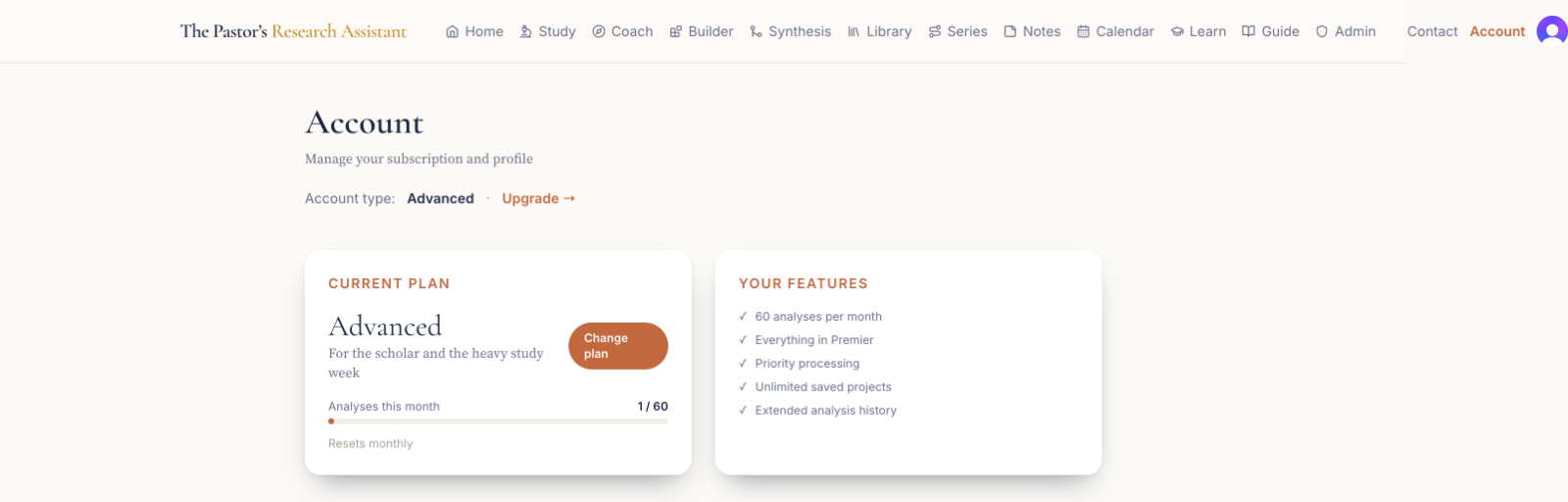
1234The Account page is where you see your plan, track your use, and manage billing. It is also where you move to a larger plan when your preaching calls for more.
- 1
Open Account from the top of the navigation.
- 2
See your current plan and how many analyses you have used this month against your plan’s limit.
- 3
Choose Upgrade to move to a larger plan when you need more analyses or more seats for a team.
- 4
Manage your billing details and subscription with Change plan, from here at any time.
Tip
Running studies in the Study counts toward your monthly plan limit. Building sermons in the Coach and the Builder is separate.